Processing & plotting data pipeline
This document shows the logical order in which data is processed to obtain the results in the paper, and the section order corresponds to the order in which the resulting data appeared in the paper. We walk through the full pipeline, starting with parsing simulation files (.json) into pickled numpy arrays (.pkl) and subsequently selecting, plotting, and analyzing various subsets or all of the data. All necessary function calls to achieve the figures used in the paper are shown, and example figures for each section and type of plot are shown within this document.
- Realistic co-culture
dish,tissue, and vasculature graph imaging - Heuristic data plotting
- Monoculture and co-culture
dishdata processing & plotting - Experimental literature data plotting
Tissuedata processing & plotting- Ranked data plotting
- Effective treatment realistic co-culture
dishandtissuesharedlocs data processing & plotting
1. Realistic co-culture dish, tissue, and vasculature graph imaging
Images of the simulations in each context are generated to highlight the differences in cancer and healthy cell spatial distributions over time.
The main function image takes in a .json file output from the simulation and produces an image of either the populations, cell states, volume density, or graphs. For this analysis, only the population and graph figures were used.
The population images were generated for the following files:
VITRO_DISH_TREAT_CH_0_NA_NA_1000_100_00.json
VIVO_TISSUE_TREAT_CH_0_NA_NA_1000_100_00.json
The graph images were generated for the following file:
VIVO_TISSUE_TREAT_CH_0_NA_NA_1000_100_00.GRAPH.json
These represent the untreated realistic co-culture dish and tissue simulations.
Workspace variables
DATA_PATHvariables are the path to subsetted data files (.jsonfiles generated from simulation output)...TIMESvariables indicate which time points to make images atSIZEvariable indicates the size to make the imagePOPS_TO_IGNOREindicate which cell population numbers to ignore (where CAR T-cell populations are listed, but are not present in these untreated simulations)BGCOLindicates what color to make the background of the imageRADIUSindicates the simulation radius out which to draw to (cells stop at radius 36, but the graph exists within the margins and out to the full radius of 40)
# Untreated co-culture dish images
DATA_PATH_IMAGE_UNTREATED_COCULTURE_CELLS = 'path/to/untreated/coculture/cells/json/to/image/'
DATA_PATH_IMAGE_UNTREATED_COCULTURE_SVG = 'path/to/untreated/coculture/svg/to/save/'
DISH_TIMES = '0,4,7'

# Untreated tissue images
DATA_PATH_IMAGE_UNTREATED_TISSUE_CELLS = 'path/to/untreated/tissue/cells/json/to/image/'
DATA_PATH_IMAGE_UNTREATED_TISSUE_SVG = 'path/to/untreated/tissue/svg/to/save/'
TISSUE_TIMES = '1,16,31'

# Population image specifications
SIZE = '5'
POPS_TO_IGNORE = '2,3'
BGCOL = '#FFFFFF'
RADIUS = '40'

# Tissue vasculature graph image specifications
DATA_PATH_IMAGE_UNTREATED_TISSUE_GRAPH = 'path/to/untreated/tissue/graph/json/to/image/'
DATA_PATH_IMAGE_UNTREATED_TISSUE_SVG = 'path/to/untreated/tissue/svg/to/save/'
Image untreated realistic co-culture dish and tissue data
from scripts.image.image import image
image(DATA_PATH_IMAGE_UNTREATED_COCULTURE_CELLS, DATA_PATH_IMAGE_UNTREATED_COCULTURE_SVG, size=SIZE, time=DISH_TIMES,
      ignore=POPS_TO_IGNORE, radius=RADIUS, pops=True)
image(DATA_PATH_IMAGE_UNTREATED_TISSUE_CELLS, DATA_PATH_IMAGE_UNTREATED_TISSUE_SVG, size=SIZE, time=TISSUE_TIMES,
      ignore=POPS_TO_IGNORE, radius=RADIUS, pops=True)
image(DATA_PATH_IMAGE_UNTREATED_TISSUE_GRAPH, DATA_PATH_IMAGE_UNTREATED_TISSUE_SVG, size=SIZE, time=TISSUE_TIMES,
      radius=RADIUS, graph=True)
Example figures
Example untreated realistic co-culture dish image.
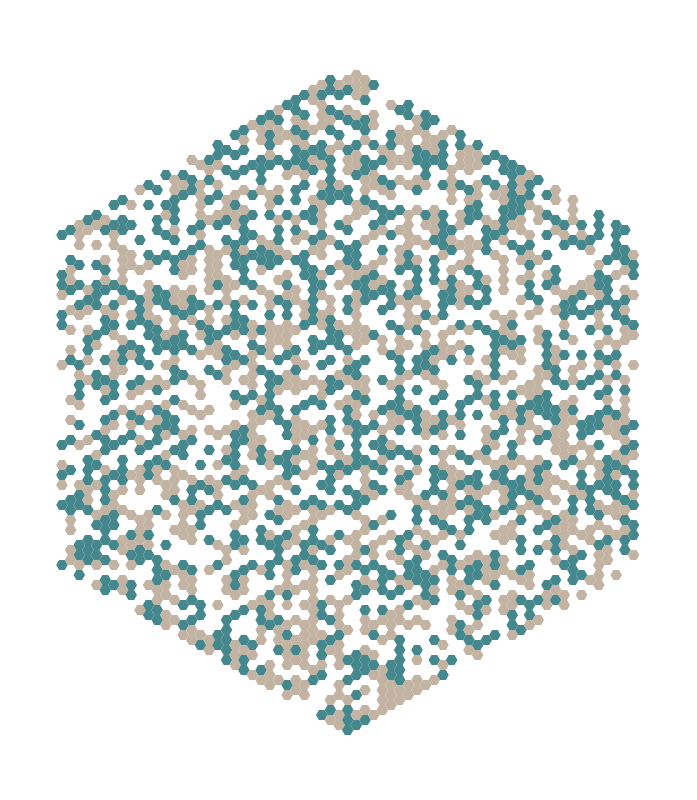
Example untreated tissue image.
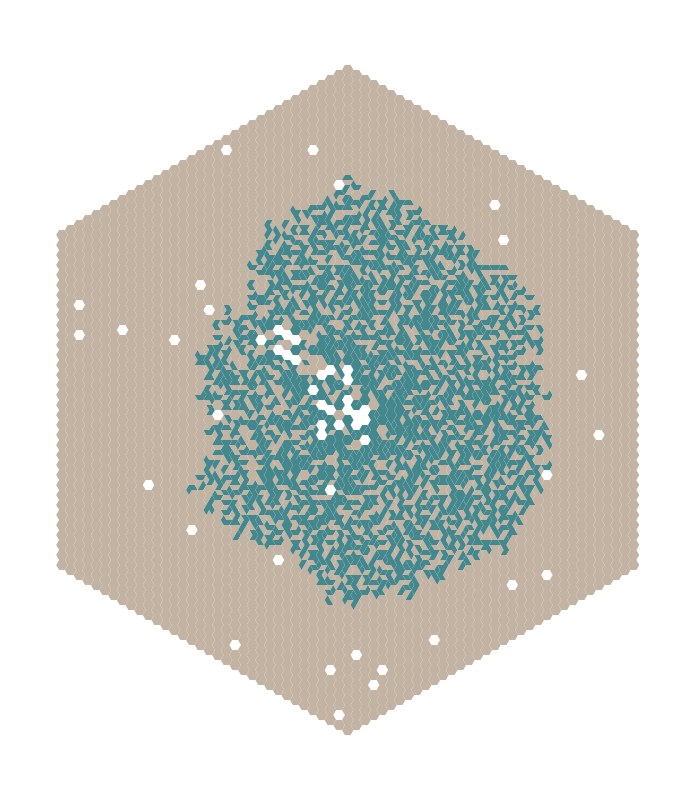
Example untreated tissue vasculature graph image.

2. Heuristic data plotting
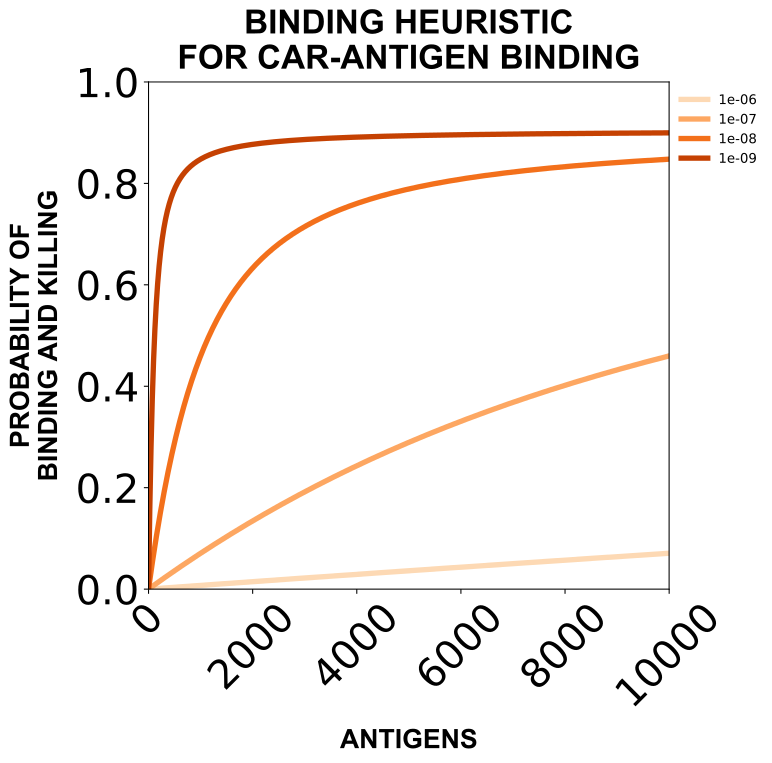
The main function (plot_heuristics_data) will make a plot the probability of binding and/or killing based on the CAR-antigen and PD1-PDL1 binding heuristics used in the paper across various values of ligand/receptor and/or binding affinity. Each time this function is run the same output will be produced.
Workspace variables
RESULTS_PATH_HEURISTICSvariable indicates where to save the heuristic plots (.svgfiles as a result of plotting)
RESULTS_PATH_HEURISTICS = 'path/to/figures/heuristics/'
Plot heuristic data
from scripts.plot.plot_data import plot_heuristics_data
scripts.plot.plot_data.plot_heuristics_data(RESULTS_PATH_HEURISTICS)
Example figure
Example heuristic figure.
3. Monoculture and co-culture dish data processing & plotting
A full combinatorial set of monoculture dish and co-culture dish data were generated where all of the following features were tested in the main set of data:
DOSE: [250, 500, 1000]TREAT RATIO: [0:100, 25:75, 50:50, 75:25, 100:0]CAR AFFINITY: [1e-6, 1e-7, 1e-8, 1e-9]ANTIGENS CANCER: [100, 500, 1000, 5000, 10000]
In the co-culture dish dataset, an additional feature was varied:
ANTIGENS HEALTHY: [0, 100]
which produced the ideal (ANTIGENS HEALTHY = 0) and realistic (ANTIGENS HEALTHY = 100) co-culture dish data.
In extended datasets, DOSE or TREAT RATIO were extended to the following:
DOSE: [250, 500, 1000, 5000, 10000]TREAT RATIO: [0:100, 10:90, 25:75, 50:50, 75:25, 90:10, 100:0]
3.1 Parse monoculture and co-culture dish data
The main parsing function (parse) iterates through each file in the data path and parses each simulation instance, extracting fields from the simulation setup, cells, and environment.
The parsed arrays are organized as:
{
    "setup": {
        "radius": R,
        "height": H,
        "time": [],
        "pops": [],
        "types": [],
        "coords": []
    },
    "agents": (N seeds) x (T timepoints) x (H height) x (C coordinates) x (P positions),
    "environments": {
        "glucose": (N seeds) x (T timepoints) x (H height) x (R radius)
        "oxygen": (N seeds) x (T timepoints) x (H height) x (R radius)
        "tgfa": (N seeds) x (T timepoints) x (H height) x (R radius)
        "IL-2": (N seeds) x (T timepoints) x (H height) x (R radius)
    }
}
where each entry in the agents array is a structured entry of the shape:
"pop"       int8    population code
"type"      int8    cell type code
"volume"    int16   cell volume (rounded)
"cycle"     int16   average cell cycle length (rounded)
The parse.py file contains general parsing functions.
Parsing can take some time.
Workspace variables
Set up workspace variables for parsing simulations.
DATA_PATHvariables are the path to simulation output data files (.tar.xzfiles of compressed simulation outputs)RESULTS_PATHvariables are the path for result files (.pklfiles generated by parsing)
# Monoculture dish data workspace variable
DATA_PATH_DISH_MONOCULTURE_TAR = 'path/to/dish/monoculture/files/tars/'
RESULTS_PATH_DISH_MONOCULTURE_PARSED = 'path/to/dish/monoculture/files/parsed/'

# Co-culture dish data workspace variable
DATA_PATH_DISH_COCULTURE_TAR = 'path/to/dish/coculture/files/tars/'
RESULTS_PATH_DISH_COCULTURE_PARSED = 'path/to/dish/coculture/files/parsed/'
Parse monoculture and co-culture dish simulations
from scripts.parse.parse import parse
parse(DATA_PATH_DISH_MONOCULTURE_TAR, RESULTS_PATH_DISH_MONOCULTURE_PKL)
parse(DATA_PATH_DISH_COCULTURE_TAR, RESULTS_PATH_DISH_COCULTURE_PKL)
3.2 Analyze parsed monoculture and co-culture dish data
Each main analyzing function (analyze_cells, analyze_env, analyze_spatial, and analyze_lysis) iterate through each parsed file (.pkl) in the data path and analyzes each simulation instance, extracting fields from the simulation setup, cells, and environment depending on the function.
analyze_cells collects cell counts for each population and state over time (files produced will end with ANALYZED).
analyze_env collects information on environmental species concentrations over time (files produced will end with ENVIRONMENT).
analyze_spatial collects cell counts for each population across simulation radii over time (files produced will end with SPATIAL).
analyze_lysis collects lysed cell information over time (files produced will end with LYSED).
Workspace variables
Set up workspace variables for analyzing simulations.
DATA_PATH...PARSEDvariables are the path to parsed data files (.pklfiles generated by parsing)DATA_PATH...LYSISvariables are the path toLYSISdata files (.LYSIS.jsonfiles generated directly from the simulation outputs)RESULTS_PATHvariables are the path for result files (.pklfiles generated by analyzing)
# Monoculture dish workspace variables
DATA_PATH_DISH_MONOCULTURE_PARSED = 'path/to/dish/monoculture/files/parsed/'
DATA_PATH_DISH_MONOCULTURE_LYSIS = 'path/to/dish/monoculture/files/lysis/'
RESULTS_PATH_DISH_MONOCULTURE_CELLS = 'path/to/dish/monoculture/files/cells/'
RESULTS_PATH_DISH_MONOCULTURE_ENVIRONMENT = 'path/to/dish/monoculture/files/environment/'
RESULTS_PATH_DISH_MONOCULTURE_SPATIAL = 'path/to/dish/monoculture/files/spatial/'
RESULTS_PATH_DISH_MONOCULTURE_LYSED = 'path/to/dish/monoculture/files/lysed/'

# Co-culture dish workspace variables
DATA_PATH_DISH_COCULTURE_PARSED = 'path/to/dish/coculture/files/parsed/'
DATA_PATH_DISH_COCULTURE_LYSIS = 'path/to/dish/coculture/files/lysis/'
RESULTS_PATH_DISH_COCULTURE_CELLS = 'path/to/dish/coculture/files/cells/'
RESULTS_PATH_DISH_COCULTURE_ENVIRONMENT = 'path/to/dish/coculture/files/environment/'
RESULTS_PATH_DISH_COCULTURE_SPATIAL = 'path/to/dish/coculture/files/spatial/'
RESULTS_PATH_DISH_COCULTURE_LYSED = 'path/to/dish/coculture/files/lysed/'
Analyze parsed monoculture and co-culture dish simulations
from scripts.analyze.analyze_cells import analyze_cells
from scripts.analyze.analyze_env import analyze_env
from scripts.analyze.analyze_spatial import analyze_spatial
from scripts.analyze.analyze_lysis import analyze_lysis
# Analyze monoculture dish data
analyze_cells(DATA_PATH_DISH_MONOCULTURE_PARSED, RESULTS_PATH_DISH_MONOCULTURE_CELLS)
analyze_env(DATA_PATH_DISH_MONOCULTURE_PARSED, RESULTS_PATH_DISH_MONOCULTURE_ENVIRONMENT)
analyze_spatial(DATA_PATH_DISH_MONOCULTURE_PARSED, RESULTS_PATH_DISH_MONOCULTURE_SPATIAL)
analyze_lysis(DATA_PATH_DISH_MONOCULTURE_LYSIS, RESULTS_PATH_DISH_MONOCULTURE_LYSED)

# Analyze co-culture dish data
analyze_cells(DATA_PATH_DISH_COCULTURE_PARSED, RESULTS_PATH_DISH_COCULTURE_CELLS)
analyze_env(DATA_PATH_DISH_COCULTURE_PARSED, RESULTS_PATH_DISH_COCULTURE_ENVIRONMENT)
analyze_spatial(DATA_PATH_DISH_COCULTURE_PARSED, RESULTS_PATH_DISH_COCULTURE_SPATIAL)
analyze_lysis(DATA_PATH_DISH_COCULTURE_LYSIS, RESULTS_PATH_DISH_COCULTURE_LYSED)
3.3 Subset analyzed monoculture and co-culture dish data
The main subsetting function (subset_data) takes in a given desired subset of data and iterates through each analyzed file in the data path (.pkl) and adds simulations matching the subset requirements to a single data file. Each subset will also automatically include the untreated control if it is in the file directory where the data is being pulled from.
A data subset for example might be all simulations where indicated features meet the following requirements:
TREAT RATIO: 50-50CAR AFFINITY: 1e-7ANTIGENS CANCER: 1000
This means all data within this subset will have the specific values of the features listed above, but all feature values of DOSE, and if applicable ANTIGENS HEALTHY, will be included. All subsets will be saved in the following format:
XML_NAME + DOSE + TREAT RATIO + CAR AFFINITY + ANTIGENS CANCER + ANTIGENS HEALTHY
where the gap between values is separated by a _, values specified in the subset are replaced with the desired value, and values not specified in the subset are replaced by an X to indicate that all values of that feature are present.
Thus, the above example would produce the following name for the monoculture dish data:
VITRO_DISH_TREAT_C_2D_X_50-50_1e-07_1000_NA_DATATYPE.pkl
Where DATATYPE is either ANALYZED for cells, ENVIRONMENT for environment, SPATIAL for spatial, or LYSED for lysed analyses.
And would produce the following name for the co-culture dish data:
VITRO_DISH_TREAT_CH_2D_X_50-50_1e-07_1000_X_DATATYPE.pkl
where the X in place of the ANTIGENS HEALTHY would be replaced by a value if a value were instead specified.
We can also collect all the data together into one file by not specifying a subset. We only need to do this for the cell (ANALYZED) data for the monoculture dish and co-culture dish data. Additionally, we can collect this with or without specifying the states flag, which if True will collect only the cell population and state counts data over time, but will exclude the volume and cell cycle distribution data. This is used particularly because files including the distribution data are very large. The states flag is only relevant to the analyze_cells function.
Workspace variables
Set up workspace variables for subsetting simulations.
DATA_PATHvariables are the path to analyzed data files (.pklfiles generated by analyzing data)RESULTS_PATHvariables are the path for result files (.pklfiles generated by subsetting)...XML_NAMEvariables are strings (that vary based on data setup) that will precede the file name extension (that vary based on subset selected)...SUBSET...variables are the requested data subsets to make (;separated lists with tuples containing keys to specific feature values that simulations in subset must include)...ALLvariables indicate to collect all data without subsettingDATA_TYPEvariables indicate which type of analyzed data is being fed into the subsetting function
# Monoculture dish workspace variables
DATA_PATH_DISH_MONOCULTURE_CELLS = 'path/to/dish/monoculture/files/cells/'
DATA_PATH_DISH_MONOCULTURE_ENVIRONMENT = 'path/to/dish/monoculture/files/environment/'
DATA_PATH_DISH_MONOCULTURE_SPATIAL = 'path/to/dish/monoculture/files/spatial/'
DATA_PATH_DISH_MONOCULTURE_LYSED = 'path/to/dish/monoculture/files/lysed/'

DISH_MONOCULTURE_XML_NAME = 'VITRO_DISH_TREAT_C_2D'

RESULTS_PATH_DISH_MONOCULTURE_SUBSET_CELLS = 'path/to/dish/monoculture/files/subset/cells/'
RESULTS_PATH_DISH_MONOCULTURE_SUBSET_ENVIRONMENT = 'path/to/dish/monoculture/files/subset/environment/'
RESULTS_PATH_DISH_MONOCULTURE_SUBSET_SPATIAL = 'path/to/dish/monoculture/files/subset/spatial/'
RESULTS_PATH_DISH_MONOCULTURE_SUBSET_LYSED = 'path/to/dish/monoculture/files/subset/lysed/'

DISH_MONOCULTURE_SUBSET_CELLS =
    '[(TREAT RATIO:50-50),(CAR AFFINITY:1e-7),(ANTIGENS CANCER:1000)];' \
    '[(DOSE:500),(CAR AFFINITY:1e-7),(ANTIGENS CANCER:1000)];' \
    '[(DOSE:500),(TREAT RATIO:50-50),(ANTIGENS CANCER:1000)];' \
    '[(DOSE:500),(TREAT RATIO:50-50),(CAR AFFINITY:1e-7)];' \
    '[(TREAT RATIO:50-50),(DOSE:500)]'
DISH_MONOCULTURE_SUBSET_OTHER =
    '[(TREAT RATIO:50-50),(CAR AFFINITY:1e-7),(ANTIGENS CANCER:1000)];' \
    '[(DOSE:500),(CAR AFFINITY:1e-7),(ANTIGENS CANCER:1000)]; ' \
    '[(DOSE:500),(TREAT RATIO:50-50),(ANTIGENS CANCER:1000)];' \
    '[(DOSE:500),(TREAT RATIO:50-50),(CAR AFFINITY:1e-7)]'
DISH_MONOCULTURE_ALL = ''

# Co-culture dish workspace variables
DATA_PATH_DISH_COCULTURE_CELLS = 'path/to/dish/coculture/files/cells/'
DATA_PATH_DISH_COCULTURE_ENVIRONMENT = 'path/to/dish/coculture/files/environment/'
DATA_PATH_DISH_COCULTURE_SPATIAL = 'path/to/dish/coculture/files/spatial/'
DATA_PATH_DISH_COCULTURE_LYSED = 'path/to/dish/coculture/files/lysed/'

DISH_COCULTURE_XML_NAME = 'VITRO_DISH_TREAT_CH_2D'

RESULTS_PATH_DISH_COCULTURE_SUBSET_CELLS = 'path/to/dish/coculture/files/subset/cells/'
RESULTS_PATH_DISH_COCULTURE_SUBSET_ENVIRONMENT = 'path/to/dish/coculture/files/subset/environment/'
RESULTS_PATH_DISH_COCULTURE_SUBSET_SPATIAL = 'path/to/dish/coculture/files/subset/spatial/'
RESULTS_PATH_DISH_COCULTURE_SUBSET_LYSED = 'path/to/dish/coculture/files/subset/lysed/'

DISH_COCULTURE_SUBSET_CELLS_IDEAL_PLUS_HA =
    '[(TREAT RATIO:50-50),(CAR AFFINITY:1e-7),(ANTIGENS CANCER:1000),(ANTIGENS HEALTHY:0)];' \
    '[(DOSE:500),(CAR AFFINITY:1e-7),(ANTIGENS CANCER:1000),(ANTIGENS HEALTHY:0)];' \
    '[(DOSE:500),(TREAT RATIO:50-50),(ANTIGENS CANCER:1000),(ANTIGENS HEALTHY:0)];' \
    '[(DOSE:500),(TREAT RATIO:50-50),(CAR AFFINITY:1e-7),(ANTIGENS HEALTHY:0)];' \
    '[(DOSE:500),(TREAT RATIO:50-50),(CAR AFFINITY:1e-7),(ANTIGENS CANCER:1000)];' \
    '[(TREAT RATIO:50-50),(DOSE:500),(ANTIGENS HEALTHY:0)]'
DISH_COCULTURE_SUBSET_CELLS_REALISTIC =
    '[(TREAT RATIO:50-50),(CAR AFFINITY:1e-7),(ANTIGENS CANCER:1000),(ANTIGENS HEALTHY:100)];' \
    '[(DOSE:500),(CAR AFFINITY:1e-7),(ANTIGENS CANCER:1000),(ANTIGENS HEALTHY:100)];' \
    '[(DOSE:500),(TREAT RATIO:50-50),(ANTIGENS CANCER:1000),(ANTIGENS HEALTHY:100)];' \
    '[(DOSE:500),(TREAT RATIO:50-50),(CAR AFFINITY:1e-7),(ANTIGENS HEALTHY:100)];' \
    '[(TREAT RATIO:50-50),(DOSE:500),(ANTIGENS HEALTHY:100)]'
DISH_COCULTURE_SUBSET_OTHER_IDEAL_PLUS_HA =
    '[(TREAT RATIO:50-50),(CAR AFFINITY:1e-7),(ANTIGENS CANCER:1000),(ANTIGENS HEALTHY:0)];' \
    '[(DOSE:500),(CAR AFFINITY:1e-7),(ANTIGENS CANCER:1000),(ANTIGENS HEALTHY:0)];' \
    '[(DOSE:500),(TREAT RATIO:50-50),(ANTIGENS CANCER:1000),(ANTIGENS HEALTHY:0)];' \
    '[(DOSE:500),(TREAT RATIO:50-50),(CAR AFFINITY:1e-7),(ANTIGENS HEALTHY:0)];' \
    '[(DOSE:500),(TREAT RATIO:50-50),(CAR AFFINITY:1e-7),(ANTIGENS CANCER:1000)]'
DISH_COCULTURE_SUBSET_OTHER_REALISTIC =
    '[(TREAT RATIO:50-50),(CAR AFFINITY:1e-7),(ANTIGENS CANCER:1000),(ANTIGENS HEALTHY:100)];' \
    '[(DOSE:500),(CAR AFFINITY:1e-7),(ANTIGENS CANCER:1000),(ANTIGENS HEALTHY:100)];' \
    '[(DOSE:500),(TREAT RATIO:50-50),(ANTIGENS CANCER:1000),(ANTIGENS HEALTHY:100)];' \
    '[(DOSE:500),(TREAT RATIO:50-50),(CAR AFFINITY:1e-7),(ANTIGENS HEALTHY:100)];' \
    '[(TREAT RATIO:50-50),(ANTIGENS CANCER:1000),(ANTIGENS HEALTHY:100)]'
DISH_COCULTURE_ALL = ''

# Types of analyses
DATA_TYPE_CELLS = 'ANALYZED'
DATA_TYPE_ENVIRONMENT = 'ENVIRONMENT'
DATA_TYPE_SPATIAL = 'SPATIAL'
DATA_TYPE_LYSED = 'LYSED'

STATES = True
Subset monoculture and co-culture dish simulations
from scripts.subset.subset import subset_data
# Subset monoculture dish data
subset_data(DATA_PATH_DISH_MONOCULTURE_CELLS, DISH_MONOCULTURE_XML_NAME, DATA_TYPE_CELLS,
            RESULTS_PATH_DISH_MONOCULTURE_SUBSET_CELLS, DISH_MONOCULTURE_SUBSET_CELLS)
subset_data(DATA_PATH_DISH_MONOCULTURE_CELLS, DISH_MONOCULTURE_XML_NAME, DATA_TYPE_CELLS,
            RESULTS_PATH_DISH_MONOCULTURE_SUBSET_CELLS, DISH_MONOCULTURE_ALL, states=True)
subset_data(DATA_PATH_DISH_MONOCULTURE_ENVIRONMENT, DISH_MONOCULTURE_XML_NAME, DATA_TYPE_ENVIRONMENT,
            RESULTS_PATH_DISH_MONOCULTURE_SUBSET_ENVIRONMENT, DISH_MONOCULTURE_SUBSET_OTHER)
subset_data(DATA_PATH_DISH_MONOCULTURE_SPATIAL, DISH_MONOCULTURE_XML_NAME, DATA_TYPE_SPATIAL,
            RESULTS_PATH_DISH_MONOCULTURE_SUBSET_SPATIAL, DISH_MONOCULTURE_SUBSET_OTHER)
subset_data(DATA_PATH_DISH_MONOCULTURE_LYSED, DISH_MONOCULTURE_XML_NAME, DATA_TYPE_LYSED,
            RESULTS_PATH_DISH_MONOCULTURE_SUBSET_LYSED, DISH_MONOCULTURE_SUBSET_OTHER)

# Subset co-culture dish data
subset_data(DATA_PATH_DISH_COCULTURE_CELLS, DISH_COCULTURE_XML_NAME, DATA_TYPE_CELLS,
            RESULTS_PATH_DISH_COCULTURE_SUBSET_CELLS, DISH_COCULTURE_SUBSET_CELLS_IDEAL_PLUS_HA)
subset_data(DATA_PATH_DISH_COCULTURE_CELLS, DISH_COCULTURE_XML_NAME, DATA_TYPE_CELLS,
            RESULTS_PATH_DISH_COCULTURE_SUBSET_CELLS, DISH_COCULTURE_SUBSET_CELLS_REALISTIC)
subset_data(DATA_PATH_DISH_COCULTURE_CELLS, DISH_COCULTURE_XML_NAME, DATA_TYPE_CELLS,
            RESULTS_PATH_DISH_COCULTURE_SUBSET_CELLS, DISH_COCULTURE_ALL, states=True)
subset_data(DATA_PATH_DISH_COCULTURE_ENVIRONMENT, DISH_COCULTURE_XML_NAME, DATA_TYPE_ENVIRONMENT,
            RESULTS_PATH_DISH_COCULTURE_SUBSET_ENVIRONMENT, DISH_COCULTURE_SUBSET_OTHER_IDEAL_PLUS_HA)
subset_data(DATA_PATH_DISH_COCULTURE_ENVIRONMENT, DISH_COCULTURE_XML_NAME, DATA_TYPE_ENVIRONMENT,
            RESULTS_PATH_DISH_COCULTURE_SUBSET_ENVIRONMENT, DISH_COCULTURE_SUBSET_OTHER_REALISTIC)
subset_data(DATA_PATH_DISH_COCULTURE_SPATIAL, DISH_COCULTURE_XML_NAME, DATA_TYPE_SPATIAL,
            RESULTS_PATH_DISH_COCULTURE_SUBSET_SPATIAL, DISH_COCULTURE_SUBSET_OTHER_IDEAL_PLUS_HA)
subset_data(DATA_PATH_DISH_COCULTURE_SPATIAL, DISH_COCULTURE_XML_NAME, DATA_TYPE_SPATIAL,
            RESULTS_PATH_DISH_COCULTURE_SUBSET_SPATIAL, DISH_COCULTURE_SUBSET_OTHER_REALISTIC)
subset_data(DATA_PATH_DISH_COCULTURE_LYSED, DISH_COCULTURE_XML_NAME, DATA_TYPE_LYSED,
            RESULTS_PATH_DISH_COCULTURE_SUBSET_LYSED, DISH_COCULTURE_SUBSET_OTHER_IDEAL_PLUS_HA)
subset_data(DATA_PATH_DISH_COCULTURE_LYSED, DISH_COCULTURE_XML_NAME, DATA_TYPE_LYSED,
            RESULTS_PATH_DISH_COCULTURE_SUBSET_LYSED, DISH_COCULTURE_SUBSET_OTHER_REALISTIC)
3.4 Plot subsetted monoculture and co-culture dish data
The main plotting function (plot_data) iterates through each subsetted file (.pkl) in the data path and plots relevant data for each subset instance.
The function enables choosing which feature to color the data by. Choosing the color to be X will enable the function to automatically color the data based on whichever features are not held constant in the subset (ex, in the example VITRO_DISH_TREAT_C_2D_X_50-50_1e-07_1000_NA.pkl for the monoculture dish subset from the example above, plots would be colored by DOSE value automatically if X were selected in place of a specific feature).
Workspace variables
Set up workspace variables for plotting simulations.
DATA_PATHvariables are the path to subsetted data files (.pklfiles generated by subsetting data)RESULTS_PATHvariables are the path for result files (.svgfiles generated by plotting)...COLORvariables indicate which feature to color the variables by (choosing the color to beXwill enable the function to automatically color the data based on whichever features are not held constant in the subset)
# Monoculture dish workspace variables
DATA_PATH_DISH_MONOCULTURE_SUBSET_CELLS = 'path/to/dish/monoculture/files/subset/cells/'
DATA_PATH_DISH_MONOCULTURE_SUBSET_ENVIRONMENT = 'path/to/dish/monoculture/files/subset/environment/'
DATA_PATH_DISH_MONOCULTURE_SUBSET_SPATIAL = 'path/to/dish/monoculture/files/subset/spatial/'
DATA_PATH_DISH_MONOCULTURE_SUBSET_LYSED = 'path/to/dish/monoculture/files/subset/lysed/'

DISH_MONOCULTURE_COLOR = 'X'

RESULTS_PATH_DISH_MONOCULTURE_FIGURES_CELLS = 'path/to/dish/monoculture/figures/cells/'
RESULTS_PATH_DISH_MONOCULTURE_FIGURES_ENVIRONMENT = 'path/to/dish/monoculture/figures/environment/'
RESULTS_PATH_DISH_MONOCULTURE_FIGURES_SPATIAL = 'path/to/dish/monoculture/figures/spatial/'
RESULTS_PATH_DISH_MONOCULTURE_FIGURES_LYSED = 'path/to/dish/monoculture/figures/lysed/'

# Co-culture dish workspace variables
DATA_PATH_DISH_COCULTURE_SUBSET_CELLS = 'path/to/dish/coculture/files/subset/cells/'
DATA_PATH_DISH_COCULTURE_SUBSET_ENVIRONMENT = 'path/to/dish/coculture/files/subset/environment/'
DATA_PATH_DISH_COCULTURE_SUBSET_SPATIAL = 'path/to/dish/coculture/files/subset/spatial/'
DATA_PATH_DISH_COCULTURE_SUBSET_LYSED = 'path/to/dish/coculture/files/subset/lysed/'

DISH_COCULTURE_COLOR = 'X'

RESULTS_PATH_DISH_COCULTURE_FIGURES_CELLS = 'path/to/dish/coculture/figures/cells/'
RESULTS_PATH_DISH_COCULTURE_FIGURES_ENVIRONMENT = 'path/to/dish/coculture/figures/environment/'
RESULTS_PATH_DISH_COCULTURE_FIGURES_SPATIAL = 'path/to/dish/coculture/figures/spatial/'
RESULTS_PATH_DISH_COCULTURE_FIGURES_LYSED = 'path/to/dish/coculture/figures/lysed/'
Plot monoculture and co-culture dish simulations
from scripts.plot.plot_data import plot_data
# Plot monoculture dish data
plot_data(DATA_PATH_DISH_MONOCULTURE_SUBSET_CELLS, DISH_MONOCULTURE_COLOR,
          RESULTS_PATH_DISH_MONOCULTURE_FIGURES_CELLS)
plot_data(DATA_PATH_DISH_MONOCULTURE_SUBSET_ENVIRONMENT, DISH_MONOCULTURE_COLOR,
          RESULTS_PATH_DISH_MONOCULTURE_FIGURES_ENVIRONMENT)
plot_data(DATA_PATH_DISH_MONOCULTURE_SUBSET_SPATIAL, DISH_MONOCULTURE_COLOR,
          RESULTS_PATH_DISH_MONOCULTURE_FIGURES_SPATIAL)
plot_data(DATA_PATH_DISH_MONOCULTURE_SUBSET_LYSED, DISH_MONOCULTURE_COLOR,
          RESULTS_PATH_DISH_MONOCULTURE_FIGURES_LYSED)

# Plot coculture dish data
plot_data(DATA_PATH_DISH_COCULTURE_SUBSET_CELLS, DISH_COCULTURE_COLOR,
          RESULTS_PATH_DISH_COCULTURE_FIGURES_CELLS)
plot_data(DATA_PATH_DISH_COCULTURE_SUBSET_ENVIRONMENT, DISH_COCULTURE_COLOR,
          RESULTS_PATH_DISH_COCULTURE_FIGURES_ENVIRONMENT)
plot_data(DATA_PATH_DISH_COCULTURE_SUBSET_SPATIAL, DISH_COCULTURE_COLOR,
          RESULTS_PATH_DISH_COCULTURE_FIGURES_SPATIAL)
plot_data(DATA_PATH_DISH_COCULTURE_SUBSET_LYSED, DISH_COCULTURE_COLOR,
          RESULTS_PATH_DISH_COCULTURE_FIGURES_LYSED)
Example figures
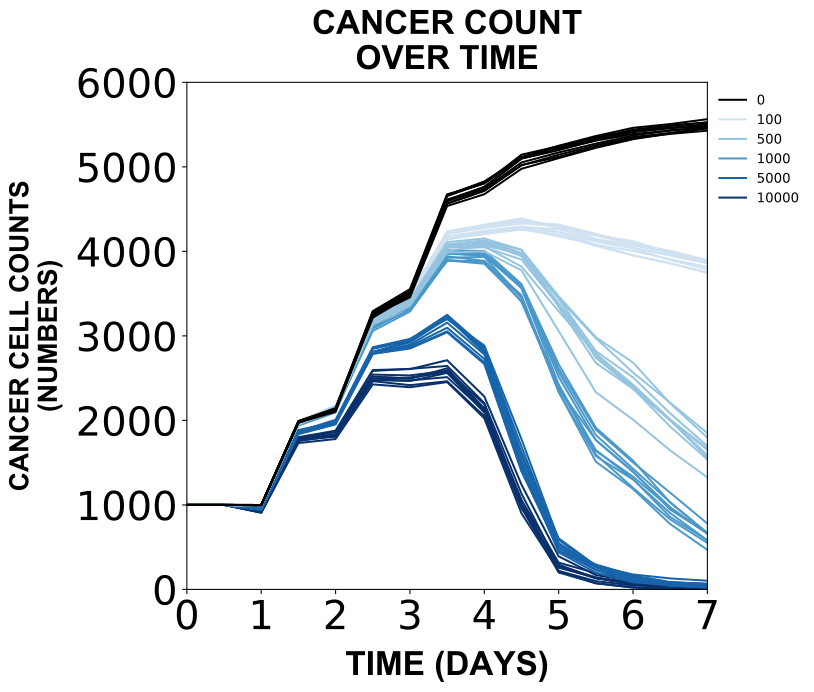
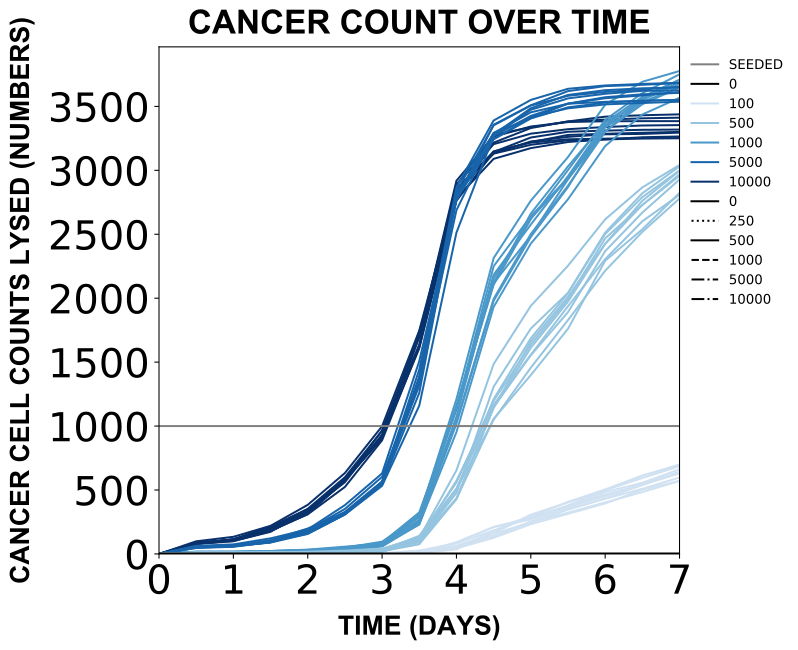
Example co-culture dish cell counts figure.
Example co-culture dish scatter plot figure.

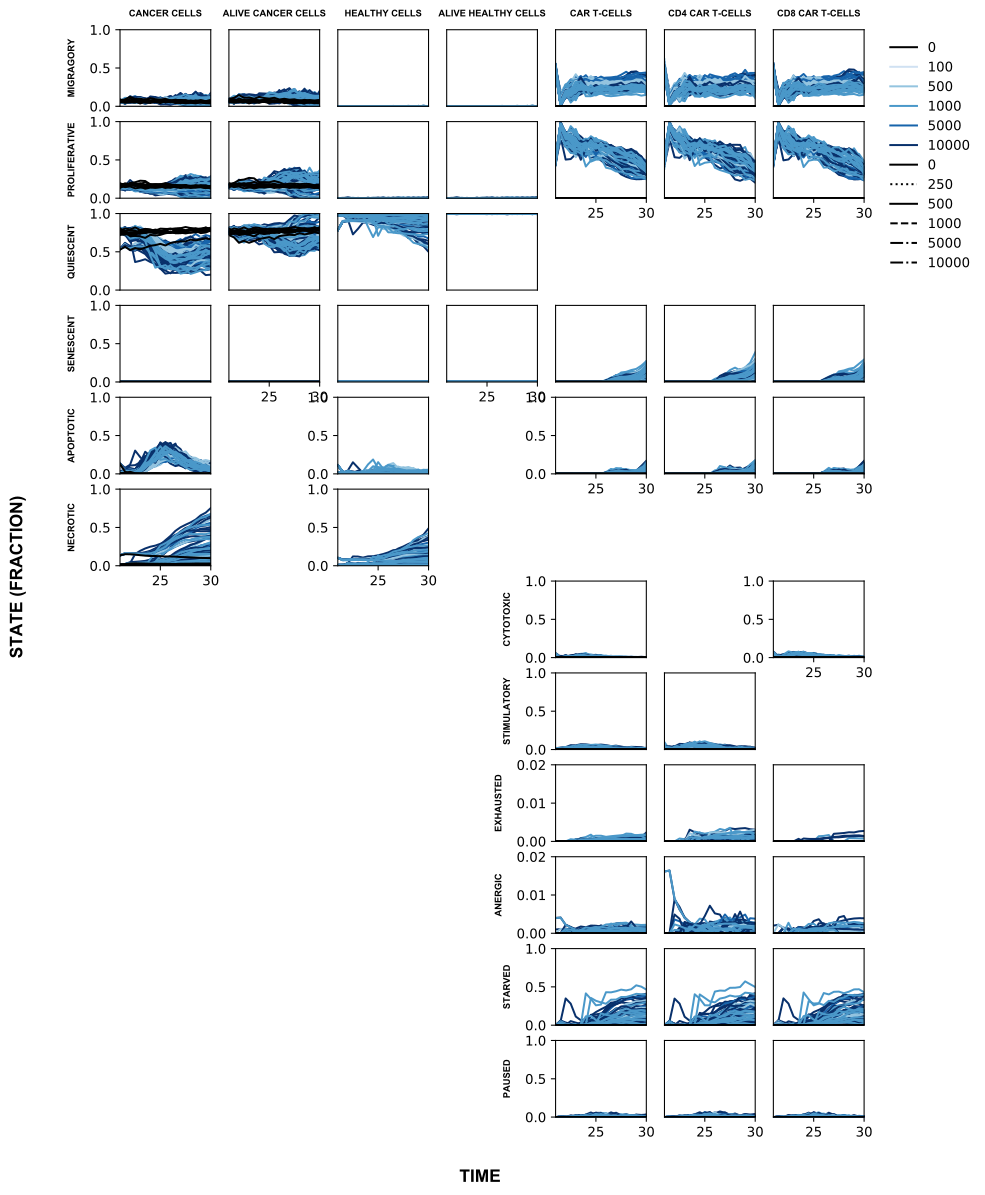
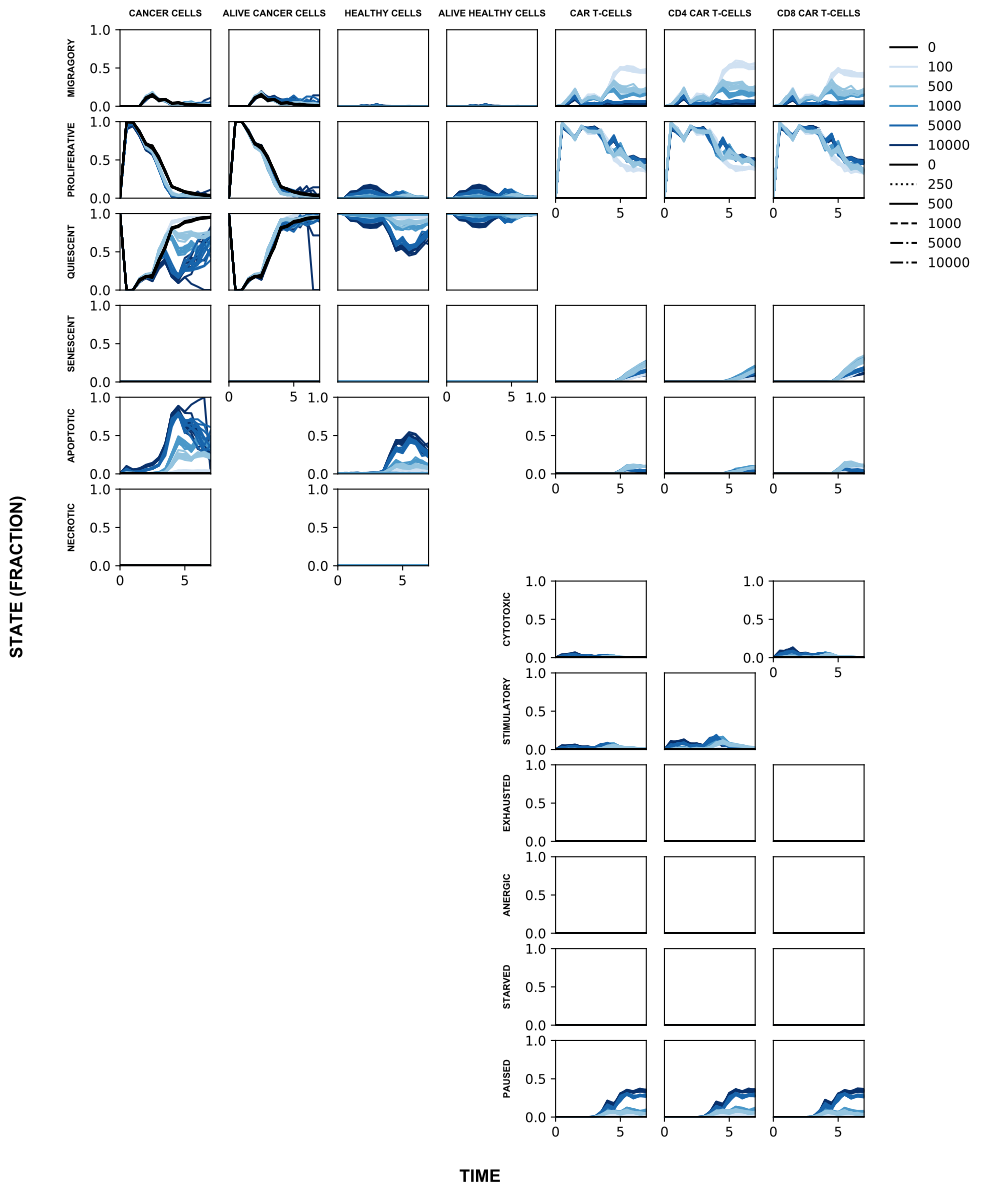
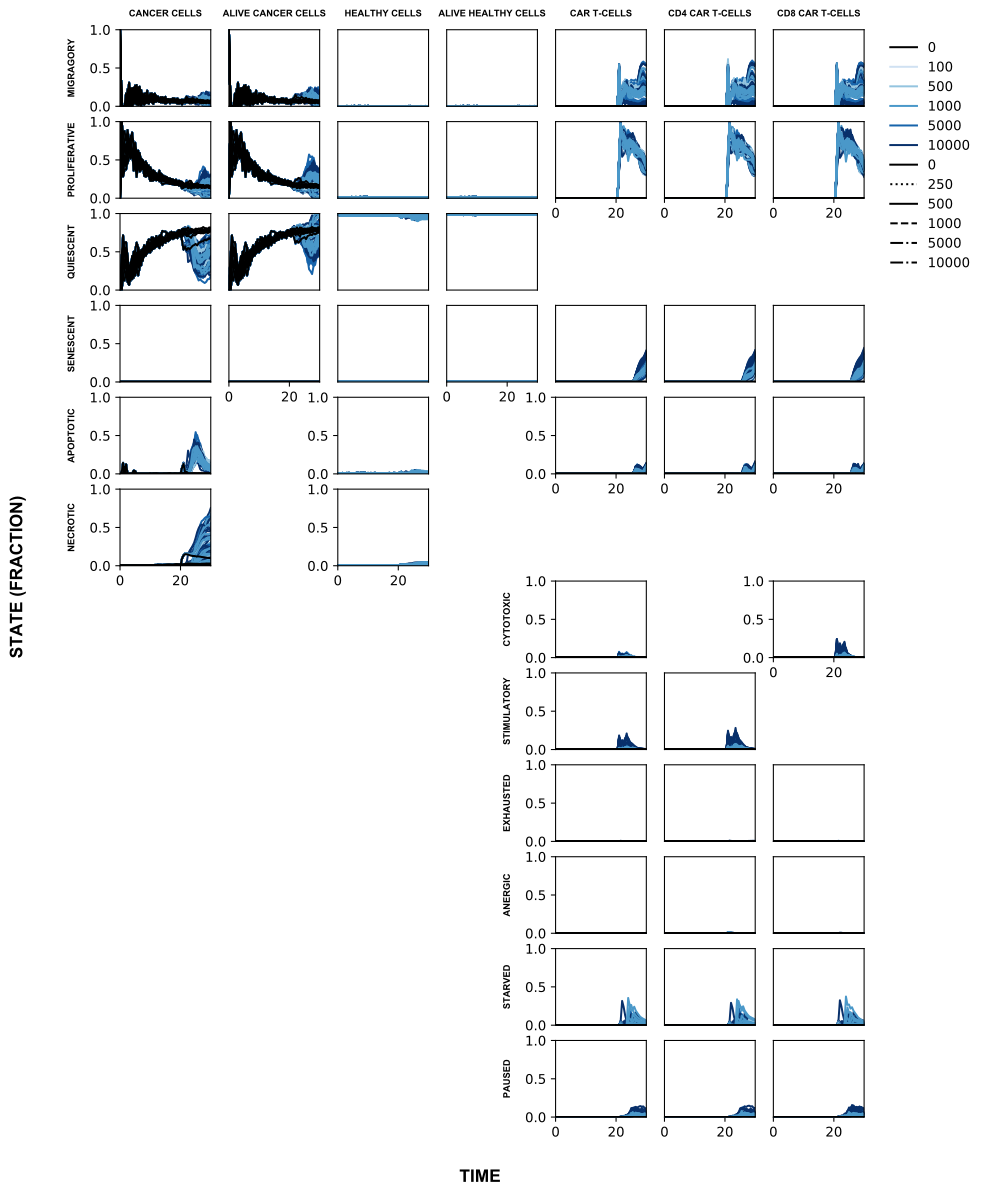
Example co-culture dish cell state fractions figure.
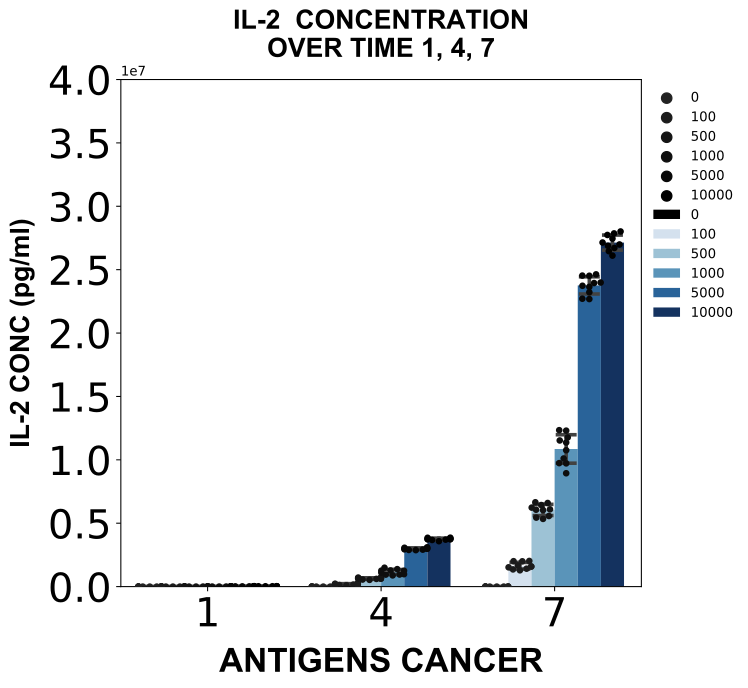
Example co-culture dish environment figure.
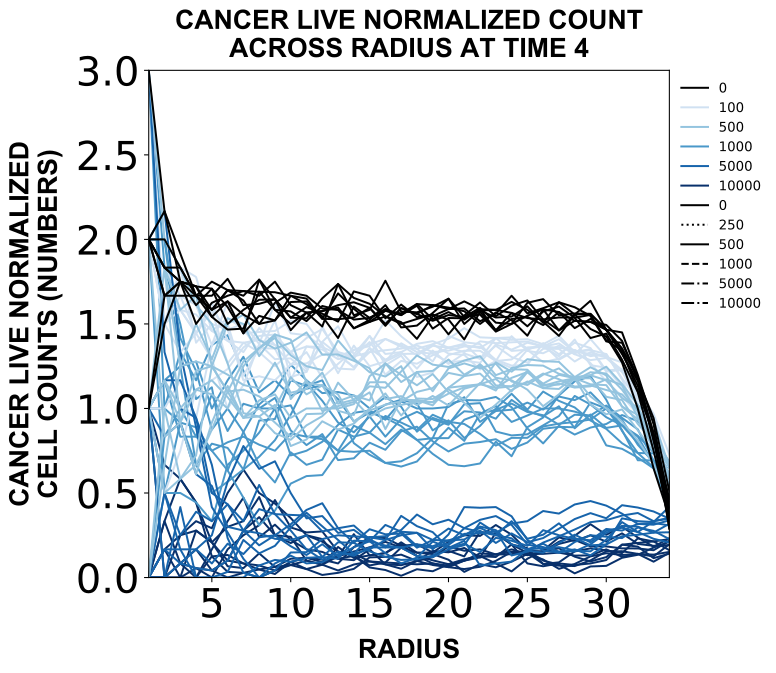
Example co-culture dish spatial figure.
Example co-culture dish lysis figure.
3.5 Multi-feature & outcome analysis of monoculture and co-culture dish data
The main outcome analysis function (stats) iterates through each subsetted file (.pkl) in the data path and plots and analyzes relevant data for each subset instance. When the average flag is set to True, data will be averaged across replicates for analysis.
For these analyses, only full data (analyzed by cell counts) subsets were used. Meaning the only relevant files are as follows:
VITRO_DISH_TREAT_C_2D_X_X_X_X_NA_STATES_ANALYZED.pkl
VITRO_DISH_TREAT_CH_2D_X_X_X_X_0_STATES_ANALYZED.pkl
VITRO_DISH_TREAT_CH_2D_X_X_X_X_100_STATES_ANALYZED.pkl
VITRO_DISH_TREAT_CH_2D_X_X_X_X_X_STATES_ANALYZED.pkl
Workspace variables
Set up workspace variables for plotting simulations.
DATA_PATHvariables are the path to subsetted data files (.pklfiles generated by subsetting data)RESULTS_PATHvariables are the path for result files (.svgor.pdfor.csvfiles generated by analyzing the data)
# Monoculture dish workspace variables
DATA_PATH_DISH_MONOCULTURE_FULL = 'path/to/dish/monoculture/subset/cells/all/'

RESULTS_PATH_DISH_MONOCULTURE_STATS = 'path/to/dish/monoculture/stats/figures/'
RESULTS_PATH_DISH_MONOCULTURE_STATS_AVERAGE = 'path/to/dish/monoculture/stats/figures/average/'

# Co-culture dish workspace variables
DATA_PATH_DISH_COCULTURE_FULL = 'path/to/dish/monoculture/subset/cells/all/'
DATA_PATH_DISH_COCULTURE_DEFINED_HA = 'path/to/dish/monoculture/subset/cells/defined/healthy/antigens/'

RESULTS_PATH_DISH_COCULTURE_STATS = 'path/to/dish/coculture/stats/figures/'
RESULTS_PATH_DISH_COCULTURE_STATS_AVERAGE = 'path/to/dish/coculture/stats/figures/average/'
Analyze monoculture and co-culture dish simulations
from scripts.stats.stats import stats
stats(DATA_PATH_DISH_MONOCULTURE_FULL, RESULTS_PATH_DISH_MONOCULTURE_STATS, average=False)
stats(DATA_PATH_DISH_MONOCULTURE_FULL, RESULTS_PATH_DISH_MONOCULTURE_STATS_AVERAGE, average=True)
stats(DATA_PATH_DISH_COCULTURE_FULL, RESULTS_PATH_DISH_COCULTURE_STATS, average=False)
stats(DATA_PATH_DISH_COCULTURE_FULL, RESULTS_PATH_DISH_COCULTURE_STATS_AVERAGE, average=True)
stats(DATA_PATH_DISH_COCULTURE_DEFINED_HA, RESULTS_PATH_DISH_COCULTURE_STATS, average=False)
stats(DATA_PATH_DISH_COCULTURE_DEFINED_HA, RESULTS_PATH_DISH_COCULTURE_STATS_AVERAGE, average=True)
Example figure
Example co-culture dish heatmap.
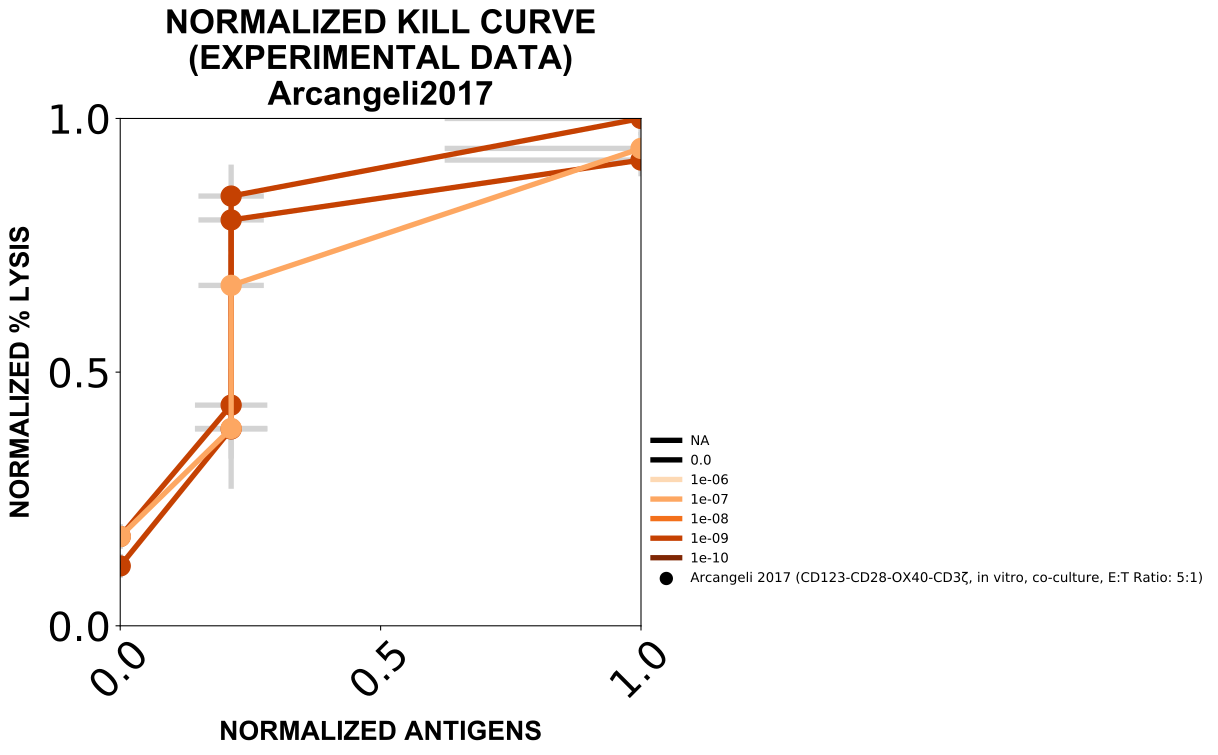
4. Experimental literature data plotting
The main function (plot_kill_curve_exp_data) will plot experimental data kill curves using data extracted from a variety of reference papers. Each time this function is run the same output will be produced.
Workspace variables
RESULTS_PATH_EXPERIMENTAL_LITERATURE_KILL_CURVESvariable indicates where to save plots based on extracted data from literature (.svgfiles as a result of plotting)
RESULTS_PATH_EXPERIMENTAL_LITERATURE_KILL_CURVES = 'path/to/figures/experimental/literature/kill/curves/'
Plot experimental literature data
from scripts.plot.plot_data import plot_kill_curve_exp_data
plot_kill_curve_exp_data(RESULTS_PATH_EXPERIMENTAL_LITERATURE_KILL_CURVES)
Example figure
Example experimental literature data figure.
5. Tissue data processing & plotting
Only a subset of tissue simulations was generated. This set are those that showed effective treatment in the realistic co-culture dish context.
5.1 Parse tissue data
The main parsing function (parse) iterates through each file in the data path and parses each simulation instance, extracting fields from the simulation setup, cells, and environment.
The parsed arrays are organized as:
{
    "setup": {
        "radius": R,
        "height": H,
        "time": [],
        "pops": [],
        "types": [],
        "coords": []
    },
    "agents": (N seeds) x (T timepoints) x (H height) x (C coordinates) x (P positions),
    "environments": {
        "glucose": (N seeds) x (T timepoints) x (H height) x (R radius)
        "oxygen": (N seeds) x (T timepoints) x (H height) x (R radius)
        "tgfa": (N seeds) x (T timepoints) x (H height) x (R radius)
        "IL-2": (N seeds) x (T timepoints) x (H height) x (R radius)
    }
}
where each entry in the agents array is a structured entry of the shape:
"pop"       int8    population code
"type"      int8    cell type code
"volume"    int16   cell volume (rounded)
"cycle"     int16   average cell cycle length (rounded)
The parse.py file contains general parsing functions.
Parsing can take some time.
Workspace variables
Set up workspace variables for parsing simulations.
DATA_PATHvariables are the path to simulation output data files (.tar.xzfiles of compressed simulation outputs)RESULTS_PATHvariables are the path for result files (.pklfiles generated by parsing)
DATA_PATH_TISSUE_TAR = 'path/to/tissue/files/tars/'
RESULTS_PATH_TISSUE_PKL = 'path/to/tissue/files/pkls/'
Parse tissue simulations
from scripts.parse.parse import parse
parse(DATA_PATH_TISSUE_TAR, RESULTS_PATH_TISSUE_PKL)
5.2 Analyze parsed tissue data
Each main analyzing function (analyze_cells, analyze_env, analyze_spatial, and analyze_lysis) iterate through each parsed file (.pkl) in the data path and analyzes each simulation instance, extracting fields from the simulation setup, cells, and environment depending on the function.
analyze_cells collects cell counts for each population and state over time (files produced will end with ANALYZED).
analyze_env collects information on environmental species concentrations over time (files produced will end with ENVIRONMENT).
analyze_spatial collects cell counts for each population across simulation radii over time (files produced will end with SPATIAL).
analyze_lysis collects lysed cell information over time (files produced will end with LYSED).
WORKSPACE VARIABLES
Set up workspace variables for analyzing simulations.
DATA_PATH...PARSEDvariables are the path to parsed data files (.pklfiles generated by parsing)DATA_PATH...LYSISvariables are the path toLYSISdata files (.LYSIS.jsonfiles generated directly from the simulation outputs)RESULTS_PATHvariables are the path for result files (.pklfiles generated by analyzing)
DATA_PATH_TISSUE_PARSED = 'path/to/tissue/files/parsed/'
DATA_PATH_TISSUE_LYSIS = 'path/to/tissue/files/lysis/'
RESULTS_PATH_TISSUE_CELLS = 'path/to/tissue/files/cells/'
RESULTS_PATH_TISSUE_ENVIRONMENT = 'path/to/tissue/files/environment/'
RESULTS_PATH_TISSUE_SPATIAL = 'path/to/tissue/files/spatial/'
RESULTS_PATH_TISSUE_LYSED = 'path/to/tissue/files/lysed/'
Analyze tissue simulations
from scripts.analyze.analyze_cells import analyze_cells
from scripts.analyze.analyze_env import analyze_env
from scripts.analyze.analyze_spatial import analyze_spatial
from scripts.analyze.analyze_lysis import analyze_lysis
# Analyze tissue data
analyze_cells(DATA_PATH_TISSUE_PARSED, RESULTS_PATH_TISSUE_CELLS)
analyze_env(DATA_PATH_TISSUE_PARSED, RESULTS_PATH_TISSUE_ENVIRONMENT)
analyze_spatial(DATA_PATH_TISSUE_PARSED, RESULTS_PATH_TISSUE_SPATIAL)
analyze_lysis(DATA_PATH_TISSUE_LYSIS, RESULTS_PATH_TISSUE_LYSED)
5.3 Subset analyzed tissue data
The main subsetting function (subset_data) takes in a given desired subset of data and iterates through each analyzed file in the data path (.pkl) and adds simulations matching the subset requirements to a single data file. Since not all possible combinations of the tissue data were collected, only the subset of all data is required.
Workspace variables
Set up workspace variables for subsetting simulations.
DATA_PATHvariables are the path to analyzed data files (.pklfiles generated by analyzing data)RESULTS_PATHvariables are the path for result files (.pklfiles generated by subsetting)TISSUE_XML_NAMEvariable is the strings (that vary based on data setup) that will precede the file name extension (that vary based on subset selected)TISSUE_ALLvariable indicate to collect all data without subsettingDATA_TYPEvariables indicate which type of analyzed data is being fed into the subsetting function
# Tissue workspace variables
DATA_PATH_TISSUE_CELLS = 'path/to/tissue/files/cells/'
DATA_PATH_TISSUE_ENVIRONMENT = 'path/to/tissue/files/environment/'
DATA_PATH_TISSUE_SPATIAL = 'path/to/tissue/files/spatial/'
DATA_PATH_TISSUE_LYSED = 'path/to/tissue/files/lysed/'

TISSUE_XML_NAME = 'VIVO_TISSUE_TREAT_CH_2D'

RESULTS_PATH_TISSUE_SUBSET_CELLS = 'path/to/tissue/files/subset/cells/'
RESULTS_PATH_TISSUE_SUBSET_ENVIRONMENT = 'path/to/tissue/files/subset/environment/'
RESULTS_PATH_TISSUE_SUBSET_SPATIAL = 'path/to/tissue/files/subset/spatial/'
RESULTS_PATH_TISSUE_SUBSET_LYSED = 'path/to/tissue/files/subset/lysed/'

TISSUE_ALL = ''

# Types of analyses
DATA_TYPE_CELLS = 'ANALYZED'
DATA_TYPE_ENVIRONMENT = 'ENVIRONMENT'
DATA_TYPE_SPATIAL = 'SPATIAL'
DATA_TYPE_LYSED = 'LYSED'
Subset tissue simulations
from scripts.subset.subset import subset_data
# Subset tissue data
subset_data(DATA_PATH_TISSUE_CELLS, TISSUE_XML_NAME, DATA_TYPE_CELLS,
            RESULTS_PATH_TISSUE_SUBSET_CELLS, TISSUE_ALL, states=True)
subset_data(DATA_PATH_TISSUE_ENVIRONMENT, TISSUE_XML_NAME, DATA_TYPE_ENVIRONMENT,
            RESULTS_PATH_TISSUE_SUBSET_ENVIRONMENT, TISSUE_ALL)
subset_data(DATA_PATH_TISSUE_SPATIAL, TISSUE_XML_NAME, DATA_TYPE_SPATIAL,
            RESULTS_PATH_TISSUE_SUBSET_SPATIAL, TISSUE_ALL)
subset_data(DATA_PATH_TISSUE_LYSED, TISSUE_XML_NAME, DATA_TYPE_LYSED,
            RESULTS_PATH_TISSUE_SUBSET_LYSED, TISSUE_ALL)
5.4 Plot subsetted tissue data
The main plotting function (plot_data) iterates through each subsetted file (.pkl) in the data path and plots relevant data for each subset instance. When the partial flag is set to True, only a partial set of a full combinatorial set of features is present and is a flag used for selecting which plots to make.
The function enables choosing which feature to color the data by. Choosing the color to be X will enable the function to automatically color the data based on whichever features are not held constant in the subset. Since not all possible combinations of the tissue data was collected, each possible feature will need to be specified (and stored in different locations as the feature color is not stored in the file name).
Workspace variables
Set up workspace variables for plotting simulations.
DATA_PATHvariables are the path to subsetted data files (.pklfiles generated by subsetting data)RESULTS_PATHvariables are the path for result files (.svgfiles generated by plotting) and one for each feature colored by is listed per each type of data plottedTISSUE_COLORvariables indicate which feature to color the variables by
# Tissue workspace variables
DATA_PATH_TISSUE_SUBSET_CELLS = 'path/to/tissue/files/subset/cells/'
DATA_PATH_TISSUE_SUBSET_ENVIRONMENT = 'path/to/tissue/files/subset/environment/'
DATA_PATH_TISSUE_SUBSET_SPATIAL = 'path/to/tissue/files/subset/spatial/'
DATA_PATH_TISSUE_SUBSET_LYSED = 'path/to/tissue/files/subset/lysed/'

TISSUE_COLOR_DOSE = 'DOSE'
TISSUE_COLOR_TREAT_RATIO = 'TREAT RATIO'
TISSUE_COLOR_CAR_AFFINITY = 'CAR AFFINITY'
TISSUE_COLOR_ANTIGENS_CANCER = 'ANTIGENS CANCER'

RESULTS_PATH_TISSUE_FIGURES_CELLS_DOSE = 'path/to/dish/coculture/figures/cells/dose/'
RESULTS_PATH_TISSUE_FIGURES_CELLS_TREAT_RATIO = 'path/to/dish/coculture/figures/cells/treat/ratio/'
RESULTS_PATH_TISSUE_FIGURES_CELLS_CAR_AFFINITY = 'path/to/dish/coculture/figures/cells/car/affinity/'
RESULTS_PATH_TISSUE_FIGURES_CELLS_ANTIGENS_CANCER = 'path/to/dish/coculture/figures/cells/antigens/cancer/'

RESULTS_PATH_TISSUE_FIGURES_ENVIRONMENT_DOSE = 'path/to/dish/coculture/figures/environment/dose/'
RESULTS_PATH_TISSUE_FIGURES_ENVIRONMENT_TREAT_RATIO = 'path/to/dish/coculture/figures/environment/treat/ratio/'
RESULTS_PATH_TISSUE_FIGURES_ENVIRONMENT_CAR_AFFINITY = 'path/to/dish/coculture/figures/environment/car/affinity/'
RESULTS_PATH_TISSUE_FIGURES_ENVIRONMENT_ANTIGENS_CANCER = 'path/to/dish/coculture/figures/environment/antigens/cancer/'

RESULTS_PATH_TISSUE_FIGURES_SPATIAL_DOSE = 'path/to/dish/coculture/figures/spatial/dose/'
RESULTS_PATH_TISSUE_FIGURES_SPATIAL_TREAT_RATIO = 'path/to/dish/coculture/figures/spatial/treat/ratio/'
RESULTS_PATH_TISSUE_FIGURES_SPATIAL_CAR_AFFINITY = 'path/to/dish/coculture/figures/spatial/car/affinity/'
RESULTS_PATH_TISSUE_FIGURES_SPATIAL_ANTIGENS_CANCER = 'path/to/dish/coculture/figures/spatial/antigens/cancer/'

RESULTS_PATH_TISSUE_FIGURES_LYSED_DOSE = 'path/to/dish/coculture/figures/lysed/dose/'
RESULTS_PATH_TISSUE_FIGURES_LYSED_TREAT_RATIO = 'path/to/dish/coculture/figures/lysed/treat/ratio/'
RESULTS_PATH_TISSUE_FIGURES_LYSED_CAR_AFFINITY = 'path/to/dish/coculture/figures/lysed/car/affinity/'
RESULTS_PATH_TISSUE_FIGURES_LYSED_ANTIGENS_CANCER = 'path/to/dish/coculture/figures/lysed/antigens/cancer/'
Plot tissue simulations
from scripts.plot.plot_data import plot_data
# Plot tissue data
plot_data(DATA_PATH_TISSUE_SUBSET_CELLS, TISSUE_COLOR_DOSE,
          RESULTS_PATH_TISSUE_FIGURES_CELLS_DOSE, partial=True)
plot_data(DATA_PATH_TISSUE_SUBSET_CELLS, TISSUE_COLOR_TREAT_RATIO,
          RESULTS_PATH_TISSUE_FIGURES_CELLS_TREAT_RATIO, partial=True)
plot_data(DATA_PATH_TISSUE_SUBSET_CELLS, TISSUE_COLOR_CAR_AFFINITY,
          RESULTS_PATH_TISSUE_FIGURES_CELLS_CAR_AFFINITY, partial=True)
plot_data(DATA_PATH_TISSUE_SUBSET_CELLS, TISSUE_COLOR_ANTIGENS_CANCER,
          RESULTS_PATH_TISSUE_FIGURES_CELLS_ANTIGENS_CANCER, partial=True)

plot_data(DATA_PATH_TISSUE_SUBSET_ENVIRONMENT, TISSUE_COLOR_DOSE,
          RESULTS_PATH_TISSUE_FIGURES_ENVIRONMENT_DOSE, partial=True)
plot_data(DATA_PATH_TISSUE_SUBSET_ENVIRONMENT, TISSUE_COLOR_TREAT_RATIO,
          RESULTS_PATH_TISSUE_FIGURES_ENVIRONMENT_TREAT_RATIO, partial=True)
plot_data(DATA_PATH_TISSUE_SUBSET_ENVIRONMENT, TISSUE_COLOR_CAR_AFFINITY,
          RESULTS_PATH_TISSUE_FIGURES_ENVIRONMENT_CAR_AFFINITY, partial=True)
plot_data(DATA_PATH_TISSUE_SUBSET_ENVIRONMENT, TISSUE_COLOR_ANTIGENS_CANCER,
          RESULTS_PATH_TISSUE_FIGURES_ENVIRONMENT_ANTIGENS_CANCER, partial=True)

plot_data(DATA_PATH_TISSUE_SUBSET_SPATIAL, TISSUE_COLOR_DOSE,
          RESULTS_PATH_TISSUE_FIGURES_SPATIAL_DOSE, partial=True)
plot_data(DATA_PATH_TISSUE_SUBSET_SPATIAL, TISSUE_COLOR_TREAT_RATIO,
          RESULTS_PATH_TISSUE_FIGURES_SPATIAL_TREAT_RATIO, partial=True)
plot_data(DATA_PATH_TISSUE_SUBSET_SPATIAL, TISSUE_COLOR_CAR_AFFINITY,
          RESULTS_PATH_TISSUE_FIGURES_SPATIAL_CAR_AFFINITY, partial=True)
plot_data(DATA_PATH_TISSUE_SUBSET_SPATIAL, TISSUE_COLOR_ANTIGENS_CANCER,
          RESULTS_PATH_TISSUE_FIGURES_SPATIAL_ANTIGENS_CANCER, partial=True)

plot_data(DATA_PATH_TISSUE_SUBSET_LYSED, TISSUE_COLOR_DOSE,
          RESULTS_PATH_TISSUE_FIGURES_LYSED_DOSE, partial=True)
plot_data(DATA_PATH_TISSUE_SUBSET_LYSED, TISSUE_COLOR_TREAT_RATIO,
          RESULTS_PATH_TISSUE_FIGURES_LYSED_TREAT_RATIO, partial=True)
plot_data(DATA_PATH_TISSUE_SUBSET_LYSED, TISSUE_COLOR_CAR_AFFINITY,
          RESULTS_PATH_TISSUE_FIGURES_LYSED_CAR_AFFINITY, partial=True)
plot_data(DATA_PATH_TISSUE_SUBSET_LYSED, TISSUE_COLOR_ANTIGENS_CANCER,
          RESULTS_PATH_TISSUE_FIGURES_LYSED_ANTIGENS_CANCER, partial=True)
Example figures
Example tissue cell counts figure.
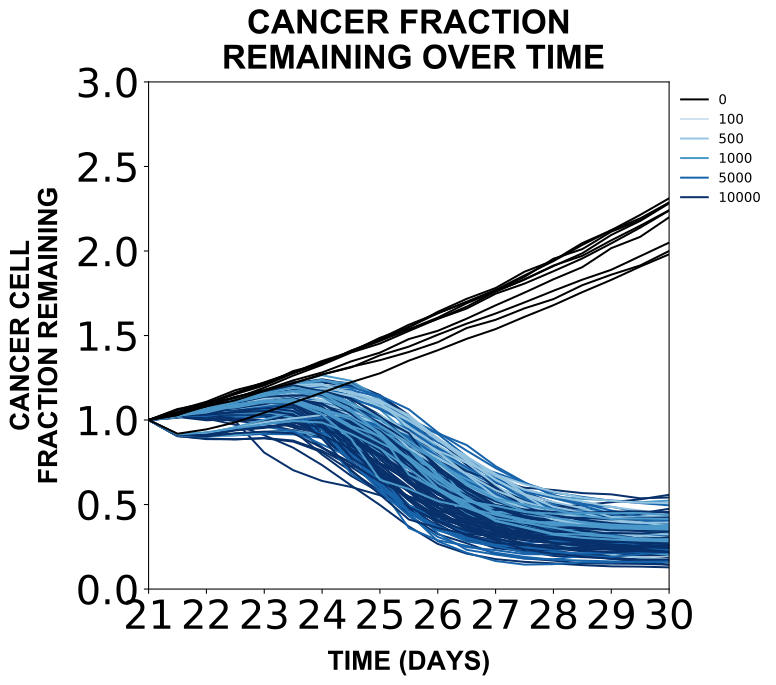
Example tissue cell scatter plot figure.
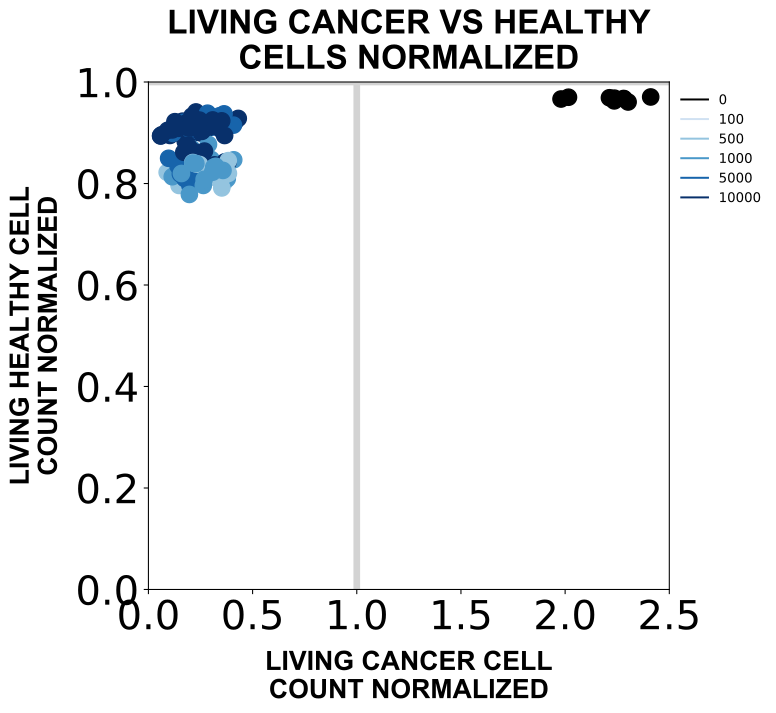
Example tissue cell state fractions figure.
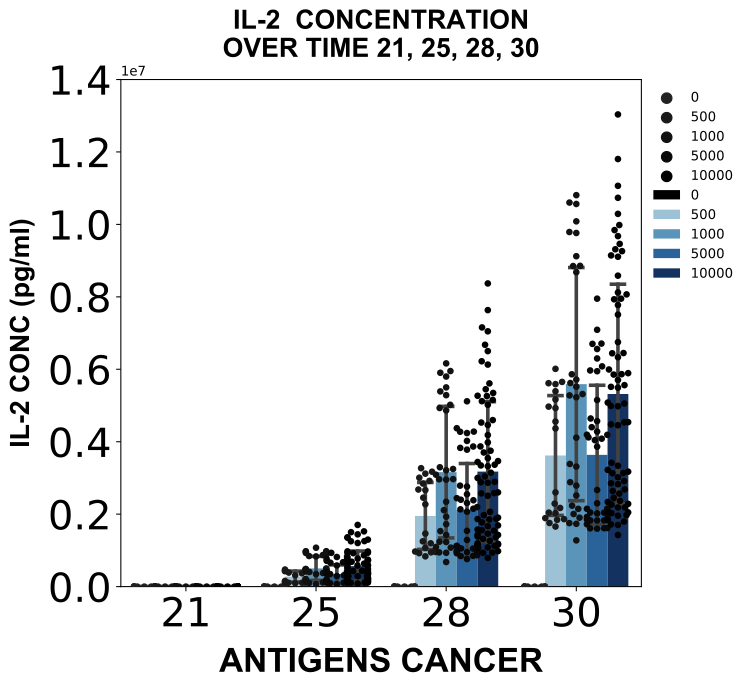
Example tissue environment figure.
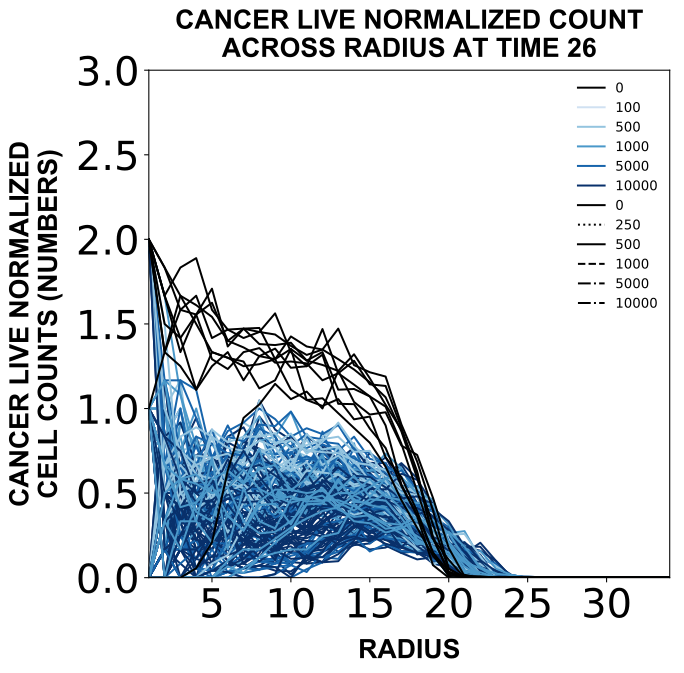
Example tissue spatial figure.
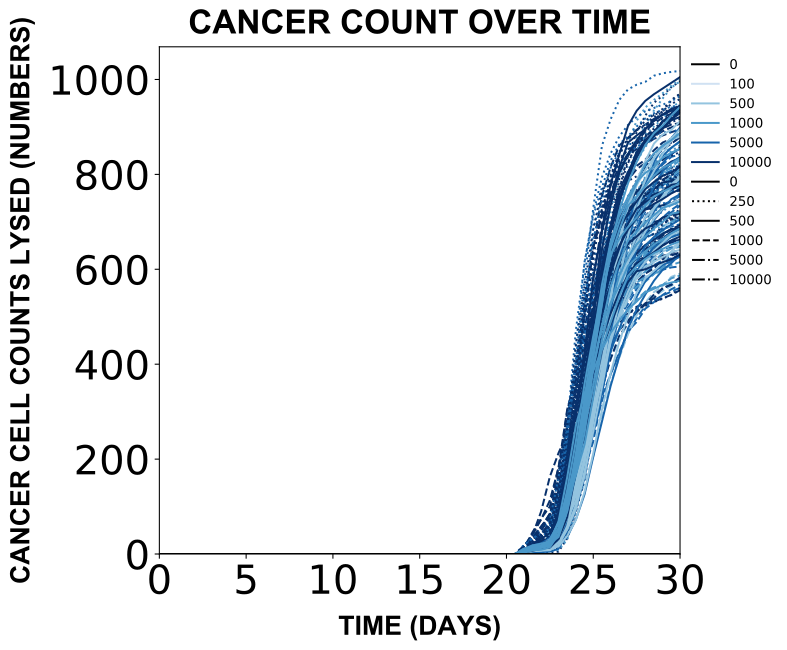
Example tissue lysis figure.
5.5 Multi-feature & outcome analysis of tissue data
The main outcome analysis function (stats) iterates through each subsetted file (.pkl) in the data path and plots and analyzes relevant data for each subset instance. When the average flag is set to True, data will be averaged across replicates for analysis.
For these analyses, only full data (analyzed by cell counts) subsets were used. Meaning the only relevant file is as follows:
VIVO_TISSUE_TREAT_C_2D_X_X_X_X_X_STATES_ANALYZED.pklWorkspace variables
Set up workspace variables for plotting simulations.
DATA_PATHvariables are the path to subsetted data files (.pklfiles generated by subsetting data)RESULTS_PATHvariables are the path for result files (.svgor.pdfor.csvfiles generated by analyzing the data)
# Tissue workspace variables
DATA_PATH_TISSUE_PARTIAL = '/path/to/tissue/subset/cells/partial/'

RESULTS_PATH_TISSUE_STATS = 'path/to/tissue/stats/figures/'
RESULTS_PATH_TISSUE_STATS_AVERAGE = 'path/to/tissue/stats/figures/average/'
Analyze tissue simulations
from scripts.stats.stats import stats
stats(DATA_PATH_TISSUE_PARTIAL, RESULTS_PATH_TISSUE_STATS, average=False)
stats(DATA_PATH_TISSUE_PARTIAL, RESULTS_PATH_TISSUE_STATS_AVERAGE, average=True)
Example figure
Example tissue heatmap.
6. Ranked data plotting
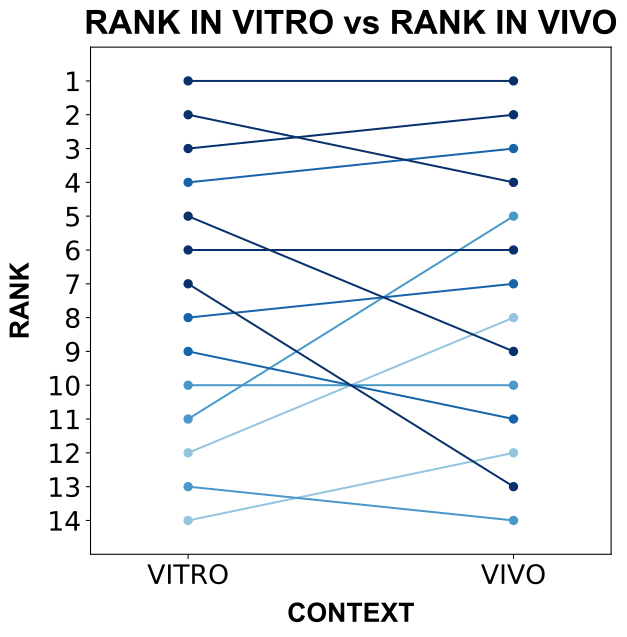
After finding the effective treatments from the realistic co-culture dish context and analyzing them in tissue, a score and rank for each simulation (averaged across replicates) were provided in both contexts and combined into a single .csv file for analysis.
The main function plot_dish_tissue_compare_data takes this .csv file as an input and generates parity and ladder plots for the rank and score of these simulations in the dish compared to the tissue context.
Workspace variables
DATA_PATHvariables are the path to csv data file (.csvfile generated for this analysis)RESULTS_PATHvariables are the path for result files (.svgfiles generated by plotting the data)COMPARE_COLORvariables indicate which feature to color the variables by (choosing the color to beXwill enable the function to automatically color the data based on each feature)
DATA_PATH_COMPARE_DISH_TISSUE_CSV = 'path/to/dish/tissue/compare/csv/file/file.csv'
RESULTS_PATH_COMPARE_DISH_TISSUE_FIGURES = 'path/to/dish/tissue/compare/figures/'

COMPARE_COLOR = 'X'
Compare effective treatment realistic co-culture dish and tissue simulations
from scripts.plot.plot_data import plot_dish_tissue_compare_data
plot_dish_tissue_compare_data(DATA_PATH_COMPARE_DISH_TISSUE_CSV, COMPARE_COLOR, RESULTS_PATH_COMPARE_DISH_TISSUE_FIGURES)
Example figure
Example rank comparison figure.
7. Effective treatment realistic co-culture dish and tissue sharedlocs data processing & plotting
To further analyze the spatial differences between the dish and tissue contexts, an additional analysis on the effective treatments is compared to show the cell state dynamics over time for only those CAR T-cells that share locations with at least one cancer cell. This analysis pipeline parallels that for the full analyses above but a different type of data is collected at the analysis stage.
7.1 Analyze parsed effective treatment realistic co-culture dish and tissue sharedlocs data
The main analyzing function used in this analysis (analyze_cells) iterates through each parsed file (.pkl) in the data path and analyzes each simulation instance, extracting fields from the simulation setup, cells, and environment depending on the function.
analyze_cells collects cell counts for each population and state over time (files produced will end with ANALYZED).
When the sharedLocs flag is set to True, only the data for CAR T-cells that share a location with at least one cancer cell is collected. When this flag is used, files produced will end with SHAREDLOCS.
Workspace variables
Set up workspace variables for analyzing simulations.
DATA_PATH...PARSEDvariables are the path to parsed data files (.pklfiles generated by parsing), where for theco-culture dishdata, one may need to manually put the effective treatment files into a folder separate from the rest of the data.RESULTS_PATHvariables are the path for result files (.pklfiles generated by analyzing)
# Realistic co-culture dish effective treatment workspace variables
DATA_PATH_DISH_COCULTURE_EFFECTIVE_TREATMENTS = 'path/to/dish/coculture/files/effective/treatments/parsed/'
RESULTS_PATH_DISH_COCULTURE_EFFECTIVE_TREATMENTS_SHAREDLOCS = 'path/to/dish/coculture/files/effective/treatments/sharedlocs/'

# Tissue effective treatment workspace variables
DATA_PATH_TISSUE_PARSED = 'path/to/tissue/files/parsed/'
RESULTS_PATH_TISSUE_SHAREDLOCS = 'path/to/tissue/files/sharedlocs/'
Analyze effective treatment realistic co-culture dish and tissue simulations
from scripts.analyze.analyze_cells import analyze_cells
analyze_cells(DATA_PATH_DISH_COCULTURE_EFFECTIVE_TREATMENTS,
              RESULTS_PATH_DISH_COCULTURE_EFFECTIVE_TREATMENTS_SHAREDLOCS, sharedLocs=True)
analyze_cells(DATA_PATH_TISSUE_PARSED,
              RESULTS_PATH_TISSUE_SHAREDLOCS, sharedLocs=True)
7.2 Subset analyzed effective treatment realistic co-culture dish and tissue sharedlocs data
The main subsetting function (subset_data) takes in a given desired subset of data and iterates through each analyzed file in the data path (.pkl) and adds simulations matching the subset requirements to a single data file. Since not all possible combinations of the tissue data was collected and only the effective treatment realistic co-culture dish data are desired, only the subset of all data is required. Additionally, only the states data is needed for this analysis.
Workspace variables
Set up workspace variables for subsetting simulations.
DATA_PATHvariables are the path to analyzed data files (.pklfiles generated by analyzing data)RESULTS_PATHvariables are the path for result files (.pklfiles generated by subsetting)..._XML_NAMEvariables are the strings (that vary based on data setup) that will precede the file name extension (that vary based on subset selected)SHAREDLOCS_ALLvariable indicate to collect all data without subsettingDATA_TYPEvariables indicate which type of analyzed data is being fed into the subsetting function
# Realistic co-culture dish effective treatment workspace variables
DATA_PATH_DISH_COCULTURE_EFFECTIVE_TREATMENTS_SHAREDLOCS = 'path/to/dish/coculture/files/effective/treatments/sharedlocs/'

DISH_COCULTURE_XML_NAME = 'VITRO_DISH_TREAT_CH_2D'

RESULTS_PATH_DISH_COCULTURE_EFFECTIVE_TREATMENTS_SUBSET_SHAREDLOCS = 'path/to/dish/coculture/subset/effective/treatments/sharedlocs/'

# Tissue effective treatment workspace variables
DATA_PATH_TISSUE_SHAREDLOCS = 'path/to/tissue/files/sharedlocs/'

TISSUE_XML_NAME = 'VIVO_TISSUE_TREAT_CH_2D'

RESULTS_PATH_TISSUE_SUBSET_SHAREDLOCS = 'path/to/tissue/subset/sharedlocs/'

# Shared locations workspace variables
DATA_TYPE_SHAREDLOCS = 'SHAREDLOCS'
SHAREDLOCS_ALL = ''
Subset effective treatment realistic co-culture dish and tissue simulations
from scripts.subset.subset import subset_data
subset_data(DATA_PATH_DISH_COCULTURE_EFFECTIVE_TREATMENTS_SHAREDLOCS, DISH_COCULTURE_XML_NAME,
            DATA_TYPE_SHAREDLOCS, RESULTS_PATH_DISH_COCULTURE_EFFECTIVE_TREATMENTS_SUBSET_SHAREDLOCS,
            subsetsRequested=SHAREDLOCS_ALL, states=True)
subset_data(DATA_PATH_TISSUE_SHAREDLOCS, TISSUE_XML_NAME,
            DATA_TYPE_SHAREDLOCS, RESULTS_PATH_TISSUE_SUBSET_SHAREDLOCS,
            subsetsRequested=SHAREDLOCS_ALL, states=True)
7.3 Plot effective treatment realistic co-culture dish and tissue sharedlocs data
The main plotting function (plot_data) iterates through each subsetted file (.pkl) in the data path and plots relevant data for each subset instance. When the partial flag is set to True, only a partial set of a full combinatorial set of features is present and is a flag used for selecting which plots to make.
The function enables choosing which feature to color the data by. Choosing the color to be X will enable the function to automatically color the data based on whichever features are not held constant in the subset. Since not all possible combinations of the tissue data was collected and only the effective treatment realistic co-culture dish are desired, the partial flag needs to be used and each desired feature to color by will need to be specified (and stored in different locations as the feature color is not stored in the file name). In this analysis, only ANTIGENS CANCER was used.
Workspace variables
Set up workspace variables for plotting simulations.
DATA_PATHvariables are the path to subsetted data files (.pklfiles generated by subsetting data)RESULTS_PATHvariables are the path for result files (.svgfiles generated by plotting) and one for each feature colored by is listed per each type of data plottedSHAREDLOCS_COLORvariables indicate which feature to color the variables by
# Realistic co-culture dish effective treatment workspace variables
DATA_PATH_DISH_COCULTURE_EFFECTIVE_TREATMENTS_SUBSET_SHAREDLOCS = 'path/to/dish/coculture/subset/effective/treatments/sharedlocs/'
RESULTS_PATH_COCULTURE_EFFECTIVE_TREATMENTS_FIGURES_SHAREDLOCS = 'path/to/dish/coculture/figures/effective/treatments/sharedlocs/'

# Tissue effective treatment workspace variables
DATA_PATH_TISSUE_SUBSET_SHAREDLOCS = 'path/to/tissue/subset/sharedlocs/'
RESULTS_PATH_TISSUE_FIGURES_SHAREDLOCS = 'path/to/tissue/figures/sharedlocs/'

# Shared locations workspace variables
SHAREDLOCS_COLOR = 'ANTIGENS CANCER'
Plot effective treatment realistic co-culture dish and tissue simulations
from scripts.plot.plot_data import plot_data
plot_data(DATA_PATH_DISH_COCULTURE_EFFECTIVE_TREATMENTS_SUBSET_SHAREDLOCS, SHAREDLOCS_COLOR,
          RESULTS_PATH_COCULTURE_EFFECTIVE_TREATMENTS_FIGURES_SHAREDLOCS, partial=True)
plot_data(DATA_PATH_TISSUE_SUBSET_SHAREDLOCS, SHAREDLOCS_COLOR,
          RESULTS_PATH_TISSUE_FIGURES_SHAREDLOCS, partial=True)
Example figure
Example tissue shared locations states data.